

【转载】自建基于Zennoposter的指纹浏览器
如果你买过Zennoposter,不想再给别的指纹浏览器掏钱;
或者你需要手动操作ZP注册出来的账号,不想来回导数据,
这篇教程正适合你!
Zennoposter本身的浏览器是可以自定义指纹信息的,详见:https://usd.fan/182.html
但是自带的浏览器正常情况只能在project maker里使用,对于操作多账号来说实在不方便。
不过ZP用C#是可以轻松做出管理功能的:
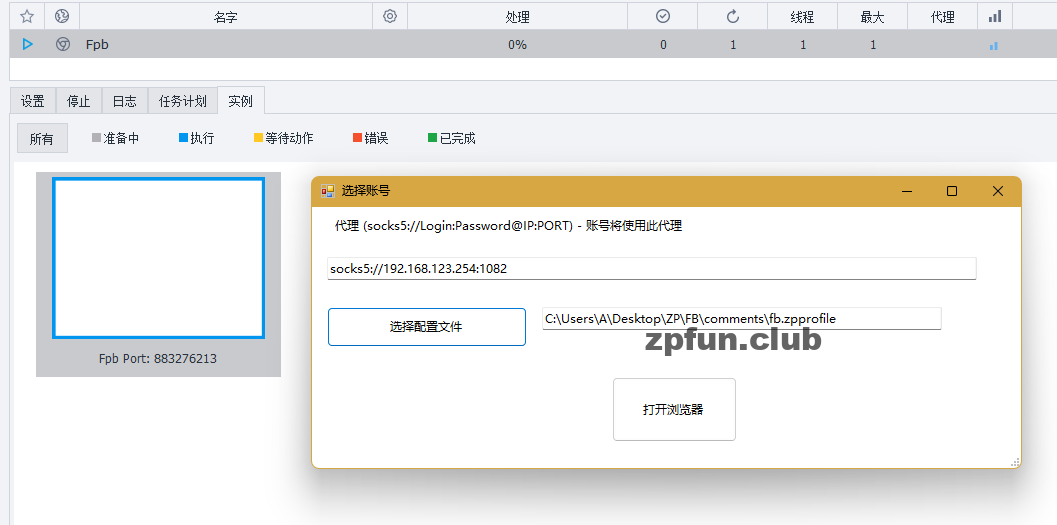
虽然没有adspower/multilogin那样点一下就能用,但是也没多几步。
并且,Zennoposter可以把整个浏览器环境保存下来,使用原环境登录大大降低了账号被风控的概率。
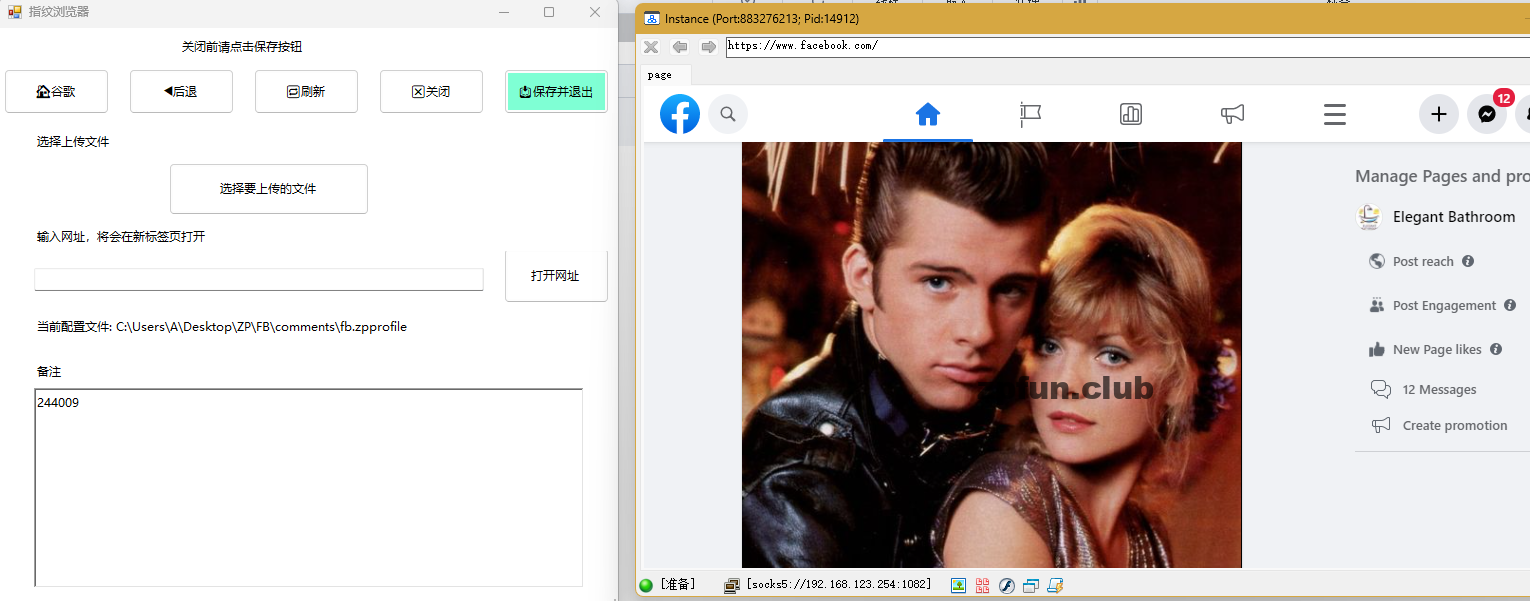
对于一些有养号需求的来说,再也不用手动往其他指纹浏览器里导数据了。
教程
环境制作
1. 根据实际需求,制作ZP环境,请参考:https://usd.fan/182.html
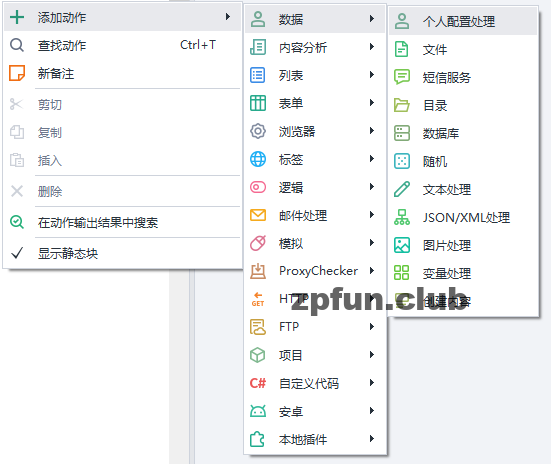
2. Porject Maker里,数据->个人配置设置
保存个人设置,下面全打勾,运行一次保存个人设置为文件。
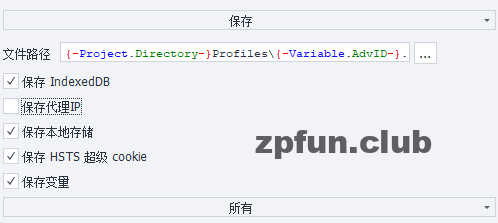
如果是给客户用的话,代理IP和变量可以不打勾,因为代理容易失效,变量在蓝色的zennoposter里无法操作。我这里打勾是因为我可能还会在PM里进行编辑。
至此,我们有了浏览器原始环境。使用这个环境做项目,完成后再保存一次配置文件,确保存下来的cookies最新。
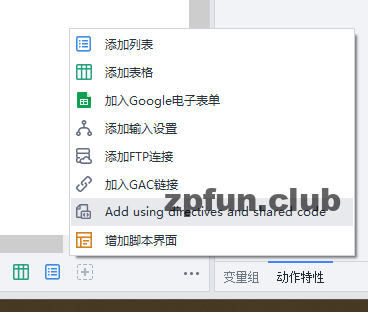
using System;using System.Collections.Generic;using System.ComponentModel;using System.Data;using System.Drawing;using System.Linq;using System.Text;using System.Threading;using System.IO;using System.Text.RegularExpressions;using ZennoLab.CommandCenter;using ZennoLab.InterfacesLibrary;using ZennoLab.InterfacesLibrary.ProjectModel;using ZennoLab.InterfacesLibrary.ProjectModel.Collections;using ZennoLab.InterfacesLibrary.ProjectModel.Enums;using ZennoLab.Macros;using Global.ZennoExtensions;using ZennoLab.Emulation; using System.Threading.Tasks;using System.Net;using System.Net.Mail; namespace ZennoLab.OwnCode{ public class ZennoBrowser { /// <summary> /// Global variable to store the proxy /// </summary> public static string publicProxy = ""; /// <summary> /// Global variable to store the first and last name of the loaded profile /// </summary> public static string publicPatchProfil = ""; /// <summary> /// First window for selecting a profile file /// </summary> /// <param name="project">input project (this project)</param> /// <param name="instance">input instance (this instance)</param> public static void FormLoadPatchProfil(IZennoPosterProjectModel project, Instance instance) { System.Windows.Forms.Form formLoadProfile = new System.Windows.Forms.Form(); formLoadProfile.Text = "选择账号"; formLoadProfile.Width = 725; // Set the form width in pixels formLoadProfile.Height = 300; // Set the form height in pixels formLoadProfile.Font = new Font("Microsoft YaHei", 9, FontStyle.Regular); formLoadProfile.BackColor = System.Drawing.Color.White; // Label for inserting the proxy System.Windows.Forms.Label labelInsertProxy = new System.Windows.Forms.Label(); labelInsertProxy.Text = "代理 (socks5://Login:Password@IP:PORT) - 账号将使用此代理"; labelInsertProxy.Location = new System.Drawing.Point(20, 10); labelInsertProxy.Width = 600; formLoadProfile.Controls.Add(labelInsertProxy); // Label for uploading the profile file System.Windows.Forms.Label labelUploadFile = new System.Windows.Forms.Label(); labelUploadFile.Text = "选择配置文件 (.zpprofile文件)"; labelUploadFile.Location = new System.Drawing.Point(20, 10); labelUploadFile.Width = 600; formLoadProfile.Controls.Add(labelUploadFile); // TextBox for entering the proxy System.Windows.Forms.TextBox textbProxy = new System.Windows.Forms.TextBox(); textbProxy.Location = new System.Drawing.Point(15, 50); textbProxy.Width = 650; formLoadProfile.Controls.Add(textbProxy); // TextBox for entering the profile to load System.Windows.Forms.TextBox textbPatch = new System.Windows.Forms.TextBox(); textbPatch.Location = new System.Drawing.Point(230, 100); textbPatch.Width = 400; formLoadProfile.Controls.Add(textbPatch); // Button to select a profile for loading System.Windows.Forms.Button buttonSelectProfile = new System.Windows.Forms.Button(); buttonSelectProfile.Text = "选择配置文件"; buttonSelectProfile.Location = new System.Drawing.Point(15, 100); buttonSelectProfile.Size = new System.Drawing.Size(200, 40); System.Windows.Forms.OpenFileDialog of = new System.Windows.Forms.OpenFileDialog(); formLoadProfile.Controls.Add(buttonSelectProfile); buttonSelectProfile.Click += delegate (object sender, System.EventArgs e) { if (of.ShowDialog() == System.Windows.Forms.DialogResult.OK) { formLoadProfile.Show(); ZennoBrowser.publicPatchProfil = of.FileName; ZennoBrowser.publicProxy = textbProxy.Text; textbPatch.Text = ZennoBrowser.publicPatchProfil; project.SendInfoToLog("正在加载配置: " + ZennoBrowser.publicPatchProfil, true); } }; // Button to download the account System.Windows.Forms.Button buttonDownloadAccount = new System.Windows.Forms.Button(); buttonDownloadAccount.Text = "打开浏览器"; buttonDownloadAccount.Location = new System.Drawing.Point(300, 170); buttonDownloadAccount.Size = new System.Drawing.Size(125, 65); formLoadProfile.Controls.Add(buttonDownloadAccount); buttonDownloadAccount.Click += delegate (object sender, System.EventArgs e) { if (ZennoBrowser.publicPatchProfil != "") formLoadProfile.Dispose(); }; formLoadProfile.ShowDialog(); } /// <summary> /// Main window for working with the profile file /// </summary> /// <param name="project">input project (this project)</param> /// <param name="instance">input instance (this instance)</param> public static void FormWorkProfil (IZennoPosterProjectModel project, Instance instance) { System.Windows.Forms.Form formWorkBrowser = new System.Windows.Forms.Form(); formWorkBrowser.Font = new Font("Microsoft YaHei", 9, FontStyle.Regular); formWorkBrowser.BackColor = System.Drawing.Color.White; formWorkBrowser.Text = "指纹浏览器"; formWorkBrowser.Width = 635; formWorkBrowser.Height = 620; // Label for indicating to save after work System.Windows.Forms.Label labelSave = new System.Windows.Forms.Label(); labelSave.Text = "关闭前请点击保存按钮"; labelSave.Location = new System.Drawing.Point(180, 10); labelSave.Width = 389; formWorkBrowser.Controls.Add(labelSave); // Label for selecting a file to upload and then clicking UPLOAD on the site System.Windows.Forms.Label labelFileDownload = new System.Windows.Forms.Label(); labelFileDownload.Text = "选择上传文件"; labelFileDownload.Location = new System.Drawing.Point(35, 105); labelFileDownload.Width = 589; formWorkBrowser.Controls.Add(labelFileDownload); // Label for entering a URL and clicking GO - the site will load in a new tab System.Windows.Forms.Label labelUrlDownload = new System.Windows.Forms.Label(); labelUrlDownload.Text = "输入网址,将会在新标签页打开"; labelUrlDownload.Location = new System.Drawing.Point(35, 200); labelUrlDownload.Width = 600; formWorkBrowser.Controls.Add(labelUrlDownload); // Label for displaying the loaded account System.Windows.Forms.Label labelDownloadAccount = new System.Windows.Forms.Label(); labelDownloadAccount.Text = "当前配置文件: " + publicPatchProfil; labelDownloadAccount.Location = new System.Drawing.Point(35, 290); labelDownloadAccount.Width = 490; labelDownloadAccount.Height = 30; formWorkBrowser.Controls.Add(labelDownloadAccount); // Label for notes System.Windows.Forms.Label labelNote = new System.Windows.Forms.Label(); labelNote.Text = "备注"; labelNote.Location = new System.Drawing.Point(35, 335); labelNote.Width = 590; formWorkBrowser.Controls.Add(labelNote); // TextBox for entering a URL to navigate System.Windows.Forms.TextBox textbGoUrl = new System.Windows.Forms.TextBox(); textbGoUrl.Location = new System.Drawing.Point(35, 240); textbGoUrl.Width = 450; formWorkBrowser.Controls.Add(textbGoUrl); // RichTextBox for notes System.Windows.Forms.RichTextBox rtboxNotes = new System.Windows.Forms.RichTextBox(); rtboxNotes.Location = new System.Drawing.Point(35, 360); rtboxNotes.Width = 550; rtboxNotes.Height = 200; rtboxNotes.Text = project.Profile.SecretQuestionAnswer2; formWorkBrowser.Controls.Add(rtboxNotes); // Button to open Google search page System.Windows.Forms.Button buttonOpenGoogle = new System.Windows.Forms.Button(); buttonOpenGoogle.Text = "?谷歌"; buttonOpenGoogle.Location = new System.Drawing.Point(5, 41); buttonOpenGoogle.Size = new System.Drawing.Size(105, 45); formWorkBrowser.Controls.Add(buttonOpenGoogle); buttonOpenGoogle.Click += delegate (object sender, System.EventArgs e) { instance.NewTab("whoer"); instance.ActiveTab.Navigate("https://www.whoer.net/"); }; // Button to go back System.Windows.Forms.Button buttonGoBack = new System.Windows.Forms.Button(); buttonGoBack.Text = "◀后退"; buttonGoBack.Location = new System.Drawing.Point(130, 41); buttonGoBack.Size = new System.Drawing.Size(105, 45); formWorkBrowser.Controls.Add(buttonGoBack); buttonGoBack.Click += delegate (object sender, System.EventArgs e) { instance.ActiveTab.GoBack(); }; // Button to reload the page System.Windows.Forms.Button buttonReloadPage = new System.Windows.Forms.Button(); buttonReloadPage.Text = "?刷新"; buttonReloadPage.Location = new System.Drawing.Point(255, 41); buttonReloadPage.Size = new System.Drawing.Size(105, 45); formWorkBrowser.Controls.Add(buttonReloadPage); buttonReloadPage.Click += delegate (object sender, System.EventArgs e) { instance.ActiveTab.MainDocument.EvaluateScript("window.location.reload(true)"); }; // Button to close the tab System.Windows.Forms.Button buttonClosePage = new System.Windows.Forms.Button(); buttonClosePage.Text = "❎关闭"; buttonClosePage.Location = new System.Drawing.Point(380, 41); buttonClosePage.Size = new System.Drawing.Size(105, 45); formWorkBrowser.Controls.Add(buttonClosePage); buttonClosePage.Click += delegate (object sender, System.EventArgs e) { instance.ActiveTab.Close(); }; // Button to save the account and exit System.Windows.Forms.Button buttonSaveAccount = new System.Windows.Forms.Button(); buttonSaveAccount.Text = "?保存并退出"; buttonSaveAccount.Location = new System.Drawing.Point(505, 41); buttonSaveAccount.Size = new System.Drawing.Size(105, 45); buttonSaveAccount.BackColor = System.Drawing.Color.Aquamarine; formWorkBrowser.Controls.Add(buttonSaveAccount); buttonSaveAccount.Click += delegate (object sender, System.EventArgs e) { project.Profile.SecretQuestionAnswer2 = rtboxNotes.Text; formWorkBrowser.Dispose(); }; // Button to choose a file System.Windows.Forms.Button buttonChooseFile = new System.Windows.Forms.Button(); buttonChooseFile.Text = "选择要上传的文件"; buttonChooseFile.Location = new System.Drawing.Point(170, 135); buttonChooseFile.Size = new System.Drawing.Size(200, 52); System.Windows.Forms.OpenFileDialog of = new System.Windows.Forms.OpenFileDialog(); formWorkBrowser.Controls.Add(buttonChooseFile); buttonChooseFile.Click += delegate (object sender, System.EventArgs e) { if (of.ShowDialog() == System.Windows.Forms.DialogResult.OK) { formWorkBrowser.Show(); instance.SetFilesForUpload(of.FileName); project.SendInfoToLog("文件已上传: " + of.FileName, true); } }; // Button to navigate to the entered URL System.Windows.Forms.Button buttonGoToUrl = new System.Windows.Forms.Button(); buttonGoToUrl.Text = "打开网址"; buttonGoToUrl.Location = new System.Drawing.Point(505, 220); buttonGoToUrl.Size = new System.Drawing.Size(105, 55); formWorkBrowser.Controls.Add(buttonGoToUrl); buttonGoToUrl.Click += delegate (object sender, System.EventArgs e) { if (textbGoUrl.Text != "") { instance.NewTab(textbGoUrl.Text); instance.ActiveTab.Navigate(textbGoUrl.Text); } }; formWorkBrowser.ShowDialog(); } /// <summary> /// Clears cache, cookies, sets proxy, closes the window, changes browser window size, and loads a profile if available /// </summary> /// <param name="project">input project (this project)</param> /// <param name="instance">input instance (this instance)</param> /// <param name="profilePath">path to the saved profile</param> public static void SetProfil(IZennoPosterProjectModel project, Instance instance, string profilePath = "") { if (!profilePath.Contains(".zpprofile")) ZennoBrowser.ErrorExit(project, instance, "配置文件不是.zpprofile格式: " + profilePath); instance.ClearCache(); instance.ClearCookie(); project.Profile.CookieContainer.Clear(); if (profilePath != "" || !File.Exists(profilePath)) { project.Profile.Load(profilePath, true); project.SendInfoToLog("配置文件已加载", true); } else ZennoBrowser.ErrorExit(project, instance, "读取配置中...配置文件未找到: " + profilePath); if (publicProxy == "") instance.ClearProxy(); else instance.SetProxy(publicProxy, false, true, true, true); instance.SetWindowSize(project.Profile.AvailScreenWidth, project.Profile.AvailScreenHeight); } /// <summary> /// Exit on error and log the error message /// </summary> /// <param name="project">input project (this project)</param> /// <param name="instance">input instance (this instance)</param> /// <param name="logMessage">Message to log</param> public static void ErrorExit(IZennoPosterProjectModel project, Instance instance, string logMessage = "") { project.SendErrorToLog(logMessage, true); throw new Exception(); } }} |
2. 然后添加一个C#
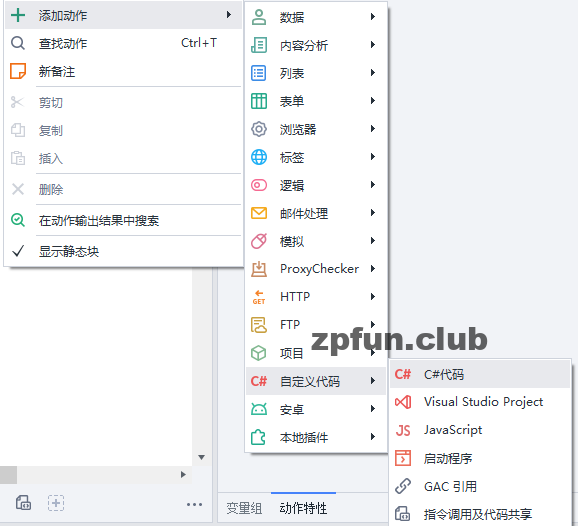
输入代码
ZennoPoster.ShowInstance("127.0.0.1", instance.Port, "server");ZennoBrowser.FormLoadPatchProfil(project, instance);ZennoBrowser.SetProfil(project, instance, ZennoBrowser.publicPatchProfil); project.SendInfoToLog(" ==== 正在使用配置文件 " + ZennoBrowser.publicPatchProfil + " =========", true); instance.ActiveTab.Navigate(@"https://www.facebook.com/");instance.ActiveTab.WaitDownloading();ZennoBrowser.FormWorkProfil(project, instance);project.SendInfoToLog(" ==== 配置文件已保存 "+ ZennoBrowser.publicPatchProfil +" =========", true); project.Profile.Save(ZennoBrowser.publicPatchProfil, true, true, true, true, true, true, true, true, true); |
运行这个C#,就能看到结果。